Welcome to my IT corner, where I've gathered all the nifty IT stuff that I find interesting and useful. Here, I share practical tips, tools, and notes from my experience to help solve tech issues and boost productivity. Hope you find it useful—thanks for stopping by!
Alexander Reydman
Browser plug in that make internet browsing secure. Affects usability, so recommended to install on one of few browsers for daily use. May affect log in, and functionality.
https://www.ghostery.com - privacy suite that gives you the power to block ads, stop trackers, and much more.
Incognito or private browsing mode is a feature that allows you to browse the web without storing your history, cookies, or other data on your device.
It can be useful for various reasons, such as protecting your privacy, avoiding personalized ads, or accessing different content. However, it does not make you completely anonymous or secure online.Please use private browsing mode when you access websites that may be potentialy harmfull, or you not sure if it safe to go to certan weblink.
How do I open a new Private Window? There are two ways to open a new Private Window:
Open a new Private Window from the Firefox menu
Click the menu button and then click New Private Window. $ :
The Private Browsing home page will open in a new window.Open a link in a new Private Window
Right-click on any link and choose Open Link in New Private Window from the context menu
Choose the right tools and train users on how they should use them.
Meaning:
Select tools and software that fit the organization’s needs, then ensure users know how to use them correctly and efficiently. A great tool is only useful if people know how to use it.
Why it matters:
Increases productivity: Users can complete tasks faster and more effectively.
Reduces errors: Proper training prevents misuse or mistakes.
Maximizes ROI: Ensures the organization gets full value from its tools.
Enhances adoption: Users are more likely to embrace tools they understand.
Improves security and compliance: Proper use reduces risks of accidental breaches or violations.
Best Practices:
Evaluate tools based on needs, ease of use, cost, and scalability.
Provide training sessions, manuals, or cheat sheets for users.
Encourage hands-on practice to reinforce learning.
Gather feedback from users to improve adoption and workflows.
Update training when tools change or are upgraded.
To improve user training and engagement, I developed a portal using Noodles https://www.noodles.com to centralize IT guides, FAQs, and resources. In addition, I sent weekly emails highlighting practical tips, tricks, and interesting IT tools to keep users informed and inspired. Regularly sharing curated content not only boosts productivity but also reinforces safe computing habits and encourages adoption of best practices

 and then click New Private Window. $
 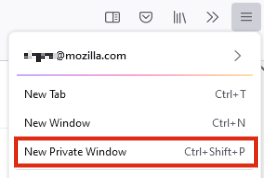 :
: Tip: Private Browsing windows have a purple mask at the top.
 https://youtu.be/TZ6stqlsVsI
