Thursday, June 1, 2023

"Hard match" for ADConnect


"Hard match" for ADConnect


On user properties  go down and find On-premises immutable ID (in this case is

QOqq1+9+7ESYAJc+xpRKAA==) of account that will be deleted.


Then collect Object ID from user that will stay


Pause synchronization by opening  Azure AD connect application

Delete 2 times user duplicate ( with no files attached)

Verify msds consistansy is not empty


If it empty  use object Duig to paste it to ms ds


Make sure user deleted twice ( from deleted users as well)

In case its not installed ( not Active directory teamstransport case)

install-module azuread

install-module msonline


Run only if session ended  ( computer restarted)

connect-azuread


connect-msolservice


 Set-AzureADUser -objectID XXXXXXX -ImmutableId XXXXXXX

Object ID its “good user” , and Immutebleld ID its from deleted user, replace and run sync


Set-AzureADUser -objectID 6215c50a-242a-4723-89aa-xxxxxxxxxxxx -ImmutableId LBWfMzBWxxxxxxxxxfaWSILpw==


Start-ADSyncSyncCycle Delta

Run Synchronization Service Manage  to monitor synchronization


Tuesday, May 16, 2023

Change number of monitors at Remote Desktop session


The connection settings are saved to a hidden RDP file in the Documents folder by default. So, you can also open this file with a text editor and directly edit the values there to set up the multi monitor remote connection. Here are the steps to do so:


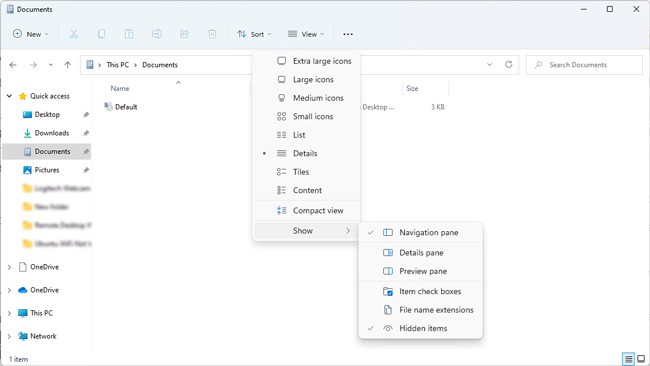
  1. Navigate to the Documents folder and make sure Show hidden items is enabled.
    rdp-file-show-hidden-items
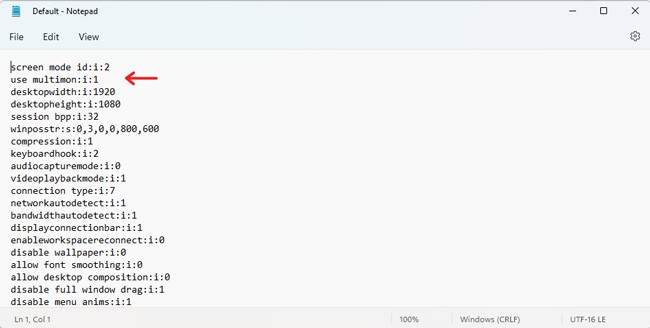
  2. Open the RDP file with a text editor, add the following line, and then save the file:
    use multimon:i:1
    use-multimon-rdp
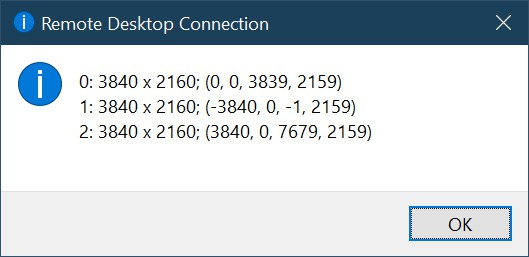
  3. If the display order is incorrect, execute the mstsc /l command in CMD to view all the monitors on your system. They’ll be listed as 0, 1, 2, and so on.
    rdp-monitors-list-mstsc-l
  4. Next, you can adjust the values for the selectedmonitors line to rearrange the monitors in the correct order.
  5. For instance, if you have 3 monitors listed as selectedmonitors:s:0,1,2, you could edit it to selectedmonitors:s:1,2,0 to change the display order, or selectedmonitors:s:0,2 to use 2 of 3 monitors.
  6. Remember to save the settings once you figure out the correct order.

Monday, May 1, 2023

Golden rule -11

 Updates are important!

Although there are occasions when updates cause a new problem to appear, generally speaking, they “help” more than they “hurt”. Not only do updates fix known bugs in software and operating systems, but they plug critical security holes that could potentially cause harm.


Friday, April 28, 2023

Golden Rules - 10

Have Disaster Recovery plan!

DRP template

Meaning:
Always prepare for the worst-case scenario. A Disaster Recovery plan ensures your organization can recover critical systems, data, and operations quickly after an unexpected event—like hardware failure, cyberattacks, natural disasters, or human error.

Why it matters:

  1. Minimizes downtime: Reduces financial and operational impact.

  2. Protects data: Ensures backups are available and restorable.

  3. Maintains reputation: Customers and stakeholders see reliability.

  4. Regulatory compliance: Many industries require documented DR plans.

  5. Preparedness: Helps staff know exactly what to do during emergencies.

Key Components of a DR Plan:

  • Inventory: Identify critical systems, data, and applications.

  • Backup Strategy: Regular, automated backups with offsite or cloud storage.

  • Recovery Procedures: Step-by-step instructions for restoring systems.

  • Roles & Responsibilities: Assign clear tasks to team members.

  • Testing & Updates: Regularly test the plan and update it as systems change.

  • Communication Plan: Notify stakeholders and employees efficiently during an incident.

Best Practices:

  • Keep the plan simple and actionable.

  • Use redundant solutions (e.g., multiple backup locations).

  • Document Recovery Time Objectives (RTOs) and Recovery Point Objectives (RPOs).

  • Include scenarios for both minor incidents and major disasters.


Wednesday, April 5, 2023

MailMaestro, your personal AI email assistant -great tool for people who not fluent in English

 This post for MailMaestro. I've been using it at work for about a month now, and I have to say, it's the best program I've installed in the past year. It's been amazing, especially for someone like me whose English isn't perfect and who writes a lot of letters. The quality of my emails has improved significantly.

What's even better is that I don't just use it for emails anymore. In fact, I'm typing this message right now on a new email, and once I'm done, I'll improve it with MailMaestro before posting it online. It's definitely something you should give a try!


Friday, March 31, 2023

URL Scanners to Check If a Link is Safe


URL Scanners to Check If a Link is Safe

  1. E.Veritas - tested, proved efecient url checker to detect malicious urls, includeing mailware, scam and phishing links.
  2. Urlvoid - This service helps you detect potentially malicious websites.
  3. Securi - security resource center that have very effective scan tool
  4. scumware.org -effective alternative for serucity and mailware researchers
  5. Checkfish - real time AI url and website scanner, implemented to Teamstransport Emails.
  6. virustotal - Scans with different antivirus companies. Analyse suspicious files, domains, IPs and URLs to detect malware and other breaches, automatically share them with the security community. Not the greates efectivnes agains complicated scams and fishing emails.

Dear all

I kindly request that before visiting any website, you take a few moments to verify its authenticity. One way to do so is by copying and pasting the URL into a website safety checker such as Urlworld or Checkfish. By doing this, you can ensure that the website is not malicious or harmful to your device.

Please remember to prioritize your online safety and security by taking the necessary precautions

Wednesday, March 29, 2023

Golden Rule - 9

Educate users!

Meaning:
End users are often the first line of defense in IT. Training them on best practices, security awareness, and proper use of systems reduces errors, security risks, and support requests.

Why it matters:

  1. Reduces mistakes: Fewer accidental deletions, misconfigurations, or system misuse.

  2. Improves security: Users learn to recognize phishing, malware, and unsafe behavior.

  3. Boosts productivity: People know how to use tools effectively.

  4. Decreases support load: Fewer tickets for common issues.

  5. Encourages compliance: Ensures company policies are followed.

Key Practices:

  • Provide regular training sessions (in-person or online).

  • Create easy-to-follow guides, cheat sheets, or videos.

  • Teach security awareness, e.g., passwords, phishing, and device safety.

  • Encourage questions and feedback to improve understanding.

  • Remind users of company IT policies and why they exist.


How Artificial Intelligence Helps System Administrators and IT Professionals

Hidden In the world of IT support, infrastructure management, automation and security, system administrators like Grek need to do more th...