User impact: Suppression rules may be edited to unintentionally suppress more alerts in the Microsoft Defender 365 portal.
Current status: We've determined that a code regression is inadvertently causing edited suppression rules to unintentionally suppress more alerts in the Microsoft Defender 365 portal. In an attempt to prevent further impact, we've introduced validation logic which will prevent users from saving invalid rules which we suspect is causing impact. To further mitigate impact, we're working on a fix to address existing impact from rules already created that have suppressed other alerts. Scope of impact: Impact is specific to users who are served through the affected infrastructure. Root cause: A code regression is inadvertently causing edited suppression rules to unintentionally suppress more alerts in the Microsoft Defender 365 portal.Welcome to my IT corner, where I've gathered all the nifty IT stuff that I find interesting and useful. Here, I share practical tips, tools, and notes from my experience to help solve tech issues and boost productivity. Hope you find it useful—thanks for stopping by! Alexander Reydman
Wednesday, July 26, 2023
Tuesday, July 11, 2023
Golden rule - 12
RTFM
Read documentation to the end before you do. Take a deep breath, grab a cup of coffee (or your preferred beverage), and dive into that documentation like a fearless adventurer. Trust me, it'll save you a ton of time and frustration in the long run.
Meaning:
Before asking for help or trying to troubleshoot a problem, read the official documentation or manuals for the product, system, or software. Most issues are already covered there.
Why it matters:
-
Saves time: Reduces trial-and-error and unnecessary support requests.
-
Builds knowledge: Helps you understand the system more deeply.
-
Encourages self-reliance: Strengthens problem-solving skills.
-
Reduces mistakes: Prevents misconfiguration or misuse of systems.
-
Improves efficiency: You can implement solutions faster with documented guidance.
Key Practices:
-
Always check the official docs first (vendor manuals, knowledge bases, internal guides).
-
Search for FAQs and troubleshooting sections before experimenting.
-
Keep a personal reference of useful guides for quick access.
-
Combine reading with testing—understand concepts, then try them safely.
Friendly Reminder:
Friday, July 7, 2023
How To Use Check Fish Scanner -An AI-powered scanner that analyzes the safety of URLs right from your inbox.
How To Use Check Fish Scanner
CheckPhish Scanner for Outlook is an AI-powered scanner that analyzes the safety of URLs right from your inbox.Find your add-in under Home tab > Get Add-ins > Admin-managed > CheckPhish Scanner for OutlookRight now it is implemented in few computers, once it will be implementen in all Teams Transport organization, you will receive email ( please see picture)Once Check Phish Scanner plug in implemented in your cmpuer ( it will be unatendet implementation) you need manualy click on fish icon, to scan suspecious email.Scan done per one email that you choose to scan, in your mailbox. It wont work in shared mailboxes.Friday, June 2, 2023
5-minute wait when you power cycle Fiber Optic router
Apparently, there are fiber optic routers out there that require a 5-minute wait when you powercycle them. Crazy, right? Always something new to discover in the world of technology.
Thursday, June 1, 2023
"Hard match" for ADConnect
"Hard
match" for ADConnect
On user properties go down and find On-premises immutable ID (in this case is
QOqq1+9+7ESYAJc+xpRKAA==)
of account that will be deleted.
Then collect Object ID from user that will stay
Pause synchronization by opening Azure AD connect application
Delete 2 times user duplicate ( with no files
attached)
Verify msds consistansy is not empty
If it empty use
object Duig to paste it to ms ds
Make sure user deleted twice ( from deleted users as well)
In case its not installed ( not Active directory
teamstransport case)
install-module azuread
install-module msonline
Run only if session ended ( computer restarted)
connect-azuread
connect-msolservice
Set-AzureADUser -objectID XXXXXXX -ImmutableId XXXXXXX
Object ID its “good user” , and Immutebleld ID its from
deleted user, replace and run sync
Set-AzureADUser -objectID 6215c50a-242a-4723-89aa-xxxxxxxxxxxx
-ImmutableId LBWfMzBWxxxxxxxxxfaWSILpw==
Start-ADSyncSyncCycle
Delta
Run Synchronization Service Manage to monitor synchronization
Tuesday, May 16, 2023
Change number of monitors at Remote Desktop session
The connection settings are saved to a hidden RDP file in the Documents folder by default. So, you can also open this file with a text editor and directly edit the values there to set up the multi monitor remote connection. Here are the steps to do so:
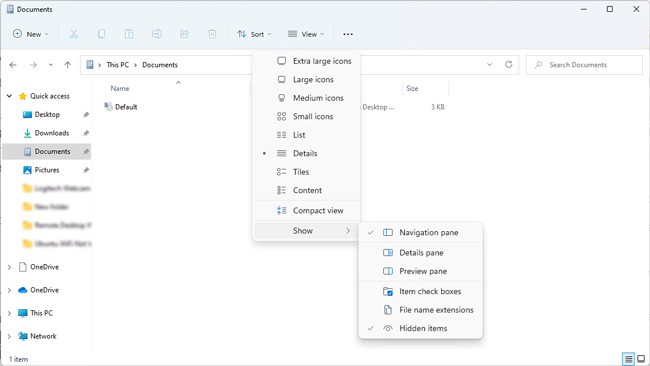
- Navigate to the Documents folder and make sure Show hidden items is enabled.

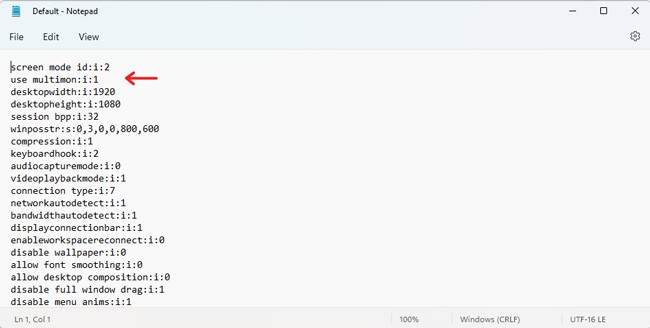
- Open the RDP file with a text editor, add the following line, and then save the file:
use multimon:i:1
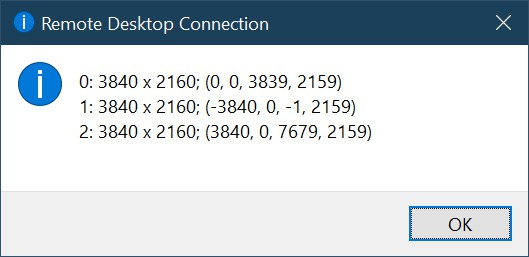
- If the display order is incorrect, execute the
mstsc /lcommand in CMD to view all the monitors on your system. They’ll be listed as 0, 1, 2, and so on.
- Next, you can adjust the values for the
selectedmonitorsline to rearrange the monitors in the correct order. - For instance, if you have 3 monitors listed as
selectedmonitors:s:0,1,2, you could edit it toselectedmonitors:s:1,2,0to change the display order, orselectedmonitors:s:0,2to use 2 of 3 monitors. - Remember to save the settings once you figure out the correct order.
Monday, May 1, 2023
Golden rule -11
Updates are important!
Although there are occasions when updates cause a new problem to appear, generally speaking, they “help” more than they “hurt”. Not only do updates fix known bugs in software and operating systems, but they plug critical security holes that could potentially cause harm.
How Artificial Intelligence Helps System Administrators and IT Professionals
Hidden In the world of IT support, infrastructure management, automation and security, system administrators like Grek need to do more th...
-
Hidden In the world of IT support, infrastructure management, automation and security, system administrators like Grek need to do more th...
-
Hidden UPDATED OCTOBER 21 1. AI-Powered Cyberattacks Surge Nation-state actors and cybercriminals are increasingly leveraging A...
-
Ransomware spiked in 2024, with attacks like LockBit 3.0 hitting small and mid-sized businesses hard, costing millions in downtime and recov...